Online Loop Station: Build Layered Loops in Your Browser (Free)
I built this loop station because my real looper — a perfectly good DigiTech JamMan — lives in a drawer. Using it means finding a free power socket, running two more cables across the floor, and by the time everything is wired up, the idea I wanted to loop is gone. So it stays in the drawer.
A loop station in a browser tab doesn't have that problem. It's already plugged in. You play, it repeats, you stack layers on top. No download, no signup, no cables beyond the ones you already have.
▶ Try the free online loop station
Works with guitar, bass, vocals or any mic input.
This guide covers the workflow I use daily: quantized recording, count-ins, overdub layering, and the latency calibration that separates tight loops from soup.
What is a loop station?
A loop station — loopstation, looper pedal, loop machine, depending on which forum you grew up on — is a recorder with exactly one trick: it plays a phrase back seamlessly, forever, and lets you record new layers (overdubs) on every pass. Guitarists loop a chord progression and practice soloing over it. Songwriters sketch arrangements. Ed Sheeran built a stadium career on the thing.
The entire skill is timing. If your loop's start and end don't land on the beat, every repetition drifts a little further off until it's unlistenable. Hardware pedals make you nail this with your foot. A good online loop station can just do it for you — that's what quantized mode is, and it's the main reason I'd point a beginner at a browser looper before a pedal.
Why I built a browser loop station
Short version: I play at my desk, in the same spot where I work, and there's always a small amp pedal plugged into the computer. I used to run a Positive Grid Spark as my desk amp, and when they announced the new Spark with a built-in looper I caught myself about to buy a whole new amp for the looper. That felt ridiculous. I write software, so instead of buying the amp I built the looper — and it turned out useful enough that keeping it to myself felt silly. Longer story here, including my theory that a looper is the one piece of gear that actually makes you a better player — I wrote that argument up here.
Online loop station vs hardware looper pedal
I own both, so this comparison has no horse in the race — they solve different problems.
| Online loop station | Hardware looper pedal | |
|---|---|---|
| Price | Free | €90–€500 |
| Setup time | It's a browser tab | Power supply, patch cables, pedalboard space |
| Where it wins | Practice, sketching, learning loop timing | Live gigs, foot control, amp-in-the-room |
| Control | Keyboard, screen, USB page-turner footswitch | Dedicated footswitches |
| Saving loops | Session-based (saving is on the roadmap) | Onboard memory / SD card |
If you gig every weekend, a Boss RC or a TC Ditto earns its pedalboard spot and this page won't talk you out of it (a proper hardware comparison is in the works). But for daily practice at a desk, the calculation is different: the best looper is the one that's already on. My JamMan is objectively better than my browser at looping. I use the browser.
How to build layered loops, step by step
The steps below use this free looper, but the workflow transfers to any loop station.
1. Pick your input
When the app opens, choose your input device and press OK to allow mic access. A laptop mic works for a first try. An audio interface is the upgrade that actually matters — more on that below.
2. Choose Quantized or Free mode
Quantized locks recording to the tempo grid you set, so the loop physically cannot drift — start there if looping is new to you. Free mode works like a classic pedal: the loop is exactly as long as your take, for better or worse. I use Free for ambient stuff and Quantized for everything else.
3. Set your tempo
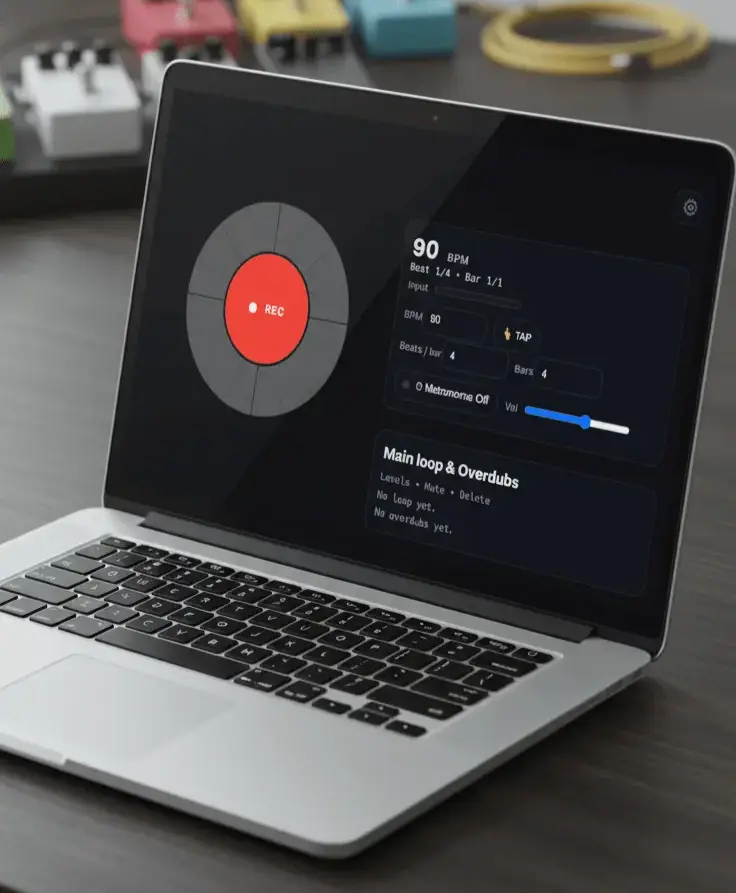
Open the tempo bar, type a BPM or tap T along with the pulse in your head, then set beats per bar and how many bars the loop runs. Turn the metronome on. It plays through your speakers but never ends up in the recording — it runs on a separate audio path, which is the kind of detail you only notice when it's missing.
4. Record the foundation
Hit the big button (or Space), wait out the count-in, and play until the loop closes. Keep this first layer boring: a progression, a muted groove — something you can stand hearing forty times in a row. Save the heroics for layer three.
5. Stack overdubs
Press O to overdub. Each pass lands as its own layer with independent volume, mute and delete, so one bad take never ruins the loop — Backspace throws away the last overdub and the rest keep playing.
6. Play over it
That's the payoff. Solo over your own changes, work out harmonies against your own rhythm section, or keep stacking until it sounds like a band that rehearses.
What actually makes loops tight
Trust the count-in — start playing on beat one of the next bar, not when your fingers feel ready. Those are different moments, and the gap between them is why loops drift.
Calibrate latency once. In Settings there's a “Latency adjust (ms)” value: record the metronome click with your mic, look at where the recorded ticks land, nudge the number until they sit on the beat. Two minutes, and every overdub afterwards lands where you played it. This is the single most skipped step and the single most common complaint.
And leave space. The loops that sound good after ten repetitions are the ones with holes in them. If layers one and two fill every beat, layer three has nowhere to live.
Not just guitar
The loop station doesn't know what a guitar is — it records whatever the input hears. Singers stack harmonies, beatboxers layer percussion, and I've hummed more than one arrangement idea into it rather than open a DAW. If your browser can hear it, you can loop it.
The gear on my desk (and what I'd buy first)
Affiliate disclosure: as an Amazon Associate and a gear4music affiliate, we earn from qualifying purchases made through some links below, at no extra cost to you.
You need nothing to start — that's the point of the thing. But two upgrades genuinely change how browser looping sounds, and they happen to be the two boxes permanently wired into my desk.
First: an audio interface. Mine is an Audient iD4 MKII — clean preamp, USB-C, two headphone outputs, zero drama since the day I bought it. If you'd rather take the road most traveled, the Focusrite Scarlett Solo is the default recommendation everywhere for a reason. Either way, the browser stops hearing “laptop mic in a room” and starts hearing your actual guitar, with latency low enough to calibrate away.
Second: something that sounds like an amp. I keep a Line 6 POD Express wired between the guitar and the interface, with an ToneX One next to it depending on the week. Both give you finished amp tone in a box smaller than your hand, so what the loop records is the sound you meant, not a dry DI signal you promise yourself you'll re-amp later. You won't. Record the real tone.
There's a longer gear rundown (including the absurdly cheap NAM-loader pedal I've been testing) in the user guide.
Loop station FAQ
Is an online loop station really free?
Yes. It runs entirely in your browser: no download, no signup, no time limit. The only thing it asks for is mic permission, so it can hear your instrument.
Can I save or export my loops?
Not yet. Loops live in the browser session and disappear when you close the tab — saving and WAV export are the next things I'm building. Bookmark it and check back.
Does it work on iPhone and Android?
Yes, in mobile Safari and Chrome with the built-in mic. USB interfaces on Android are hit-or-miss (some vendors never expose them to the browser — not fixable from a web app, sadly). The guide has the troubleshooting details.
Can I use it for vocals or beatbox?
Yes — it records whatever input you pick: vocals, beatbox, keys through a mic, anything plugged into your interface.
Why are my overdubs slightly out of time?
Latency. Settings → “Latency adjust (ms)”, calibrate once with the metronome trick described above. An audio interface helps too.
Do I need to install anything?
No. Open the page, allow the mic, loop. Current Chrome, Edge, Safari and Firefox all work.
Start looping now
Open the loop station, set 90 BPM, record four bars of something dumb, and stack one overdub on top. Five minutes. If it doesn't hook you, fine — at least you didn't have to plug anything in.
Want the bigger picture first — what browser looping does well and where it honestly stops? Read the online looper overview.